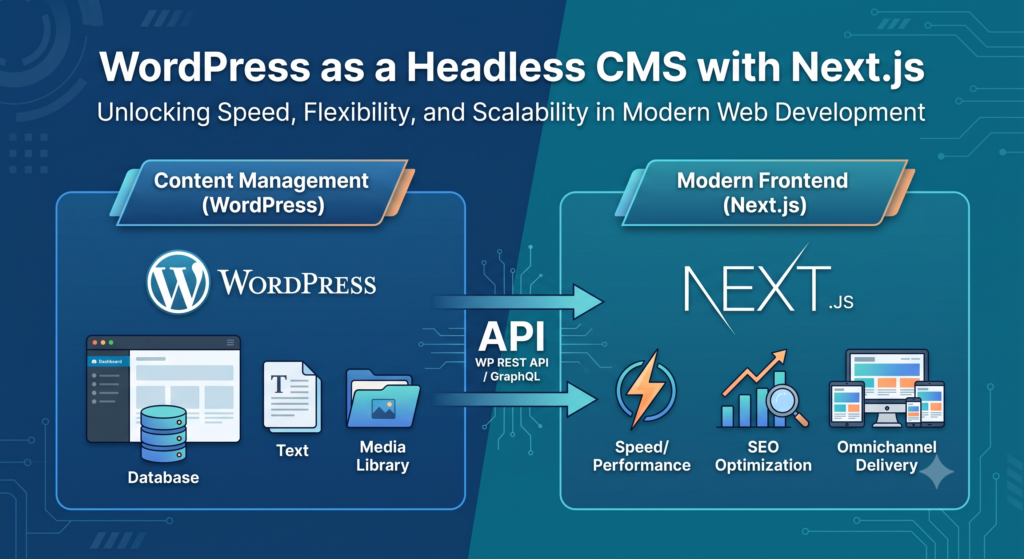
In the ever-evolving landscape of web development, flexibility and speed are paramount. Developers are increasingly moving toward headless CMS solutions for their ability to deliver dynamic content across multiple platforms, with a focus on performance, security, and scalability. One such powerful combination is WordPress as a headless CMS and Next.js for the frontend. This blog will explore how this duo is changing the way we approach modern web development.
What is a Headless CMS?
A headless CMS is a content management system that provides a back-end interface for managing content but leaves the front-end presentation (the “head”) entirely separate. Traditional CMS platforms, like WordPress, come with built-in themes and templating engines, tightly coupling the back-end and front-end. In contrast, a headless CMS gives you the freedom to fetch content via an API and display it wherever you need, whether it’s a website, mobile app, or IoT device.
Why Use WordPress as a Headless CMS?
WordPress, the world’s most popular CMS, has been traditionally known for its powerful content management capabilities. However, its default theme structure and tight coupling with the front-end sometimes limit its flexibility. Enter the headless approach—WordPress can serve as a content hub while delivering content via REST APIs or GraphQL, allowing developers to choose any front-end framework.
With this setup, WordPress remains the trusted content management solution, and developers gain the freedom to design the front-end with modern JavaScript frameworks, like Next.js.
What is Next.js?
Next.js is a popular React-based framework that focuses on server-side rendering (SSR), static site generation (SSG), and incremental static regeneration (ISR). With Next.js, developers can build blazing-fast websites with a hybrid approach, combining static and dynamic content. It also allows you to create fully optimized pages out of the box, making it ideal for building modern web applications.
The Benefits of Combining WordPress with Next.js
1. Improved Performance
By decoupling the back-end from the front-end, Next.js ensures that pages are pre-rendered (using static generation) or server-side rendered, leading to faster load times. This can significantly improve performance compared to traditional WordPress themes.
2. SEO Optimization
Next.js is SEO-friendly out of the box, with built-in support for static pages and server-side rendering. Since SEO depends on how content is delivered and indexed by search engines, this gives you full control over SEO optimization for your WordPress content.
3. Scalability
Headless WordPress can handle vast amounts of content and data. Combined with Next.js’s efficient rendering strategies, it allows for quick loading, even with heavy traffic.
4. Flexibility and Customization
With Next.js, you’re not tied to predefined templates or themes. You have the flexibility to create custom, dynamic user experiences tailored to your exact requirements. The decoupling of the front-end from the CMS allows for an entirely personalized design and user interface.
5. Omnichannel Delivery
Since Next.js fetches content via APIs, this architecture allows you to push the same content across different platforms. Whether it’s a website, mobile app, or even smart devices, you can deliver content seamlessly across all devices.
How to Set Up WordPress as a Headless CMS with Next.js
- Install WordPress: Begin by setting up a standard WordPress instance. You can either do this locally or through a managed hosting provider. Ensure that your WordPress installation is updated.
- Enable REST API: By default, WordPress comes with a REST API. To get started, you’ll need to ensure that it’s enabled. This API will serve as the bridge between WordPress and Next.js, allowing you to fetch content.
- Create a Next.js Project: Initialize a new Next.js application by running
npx create-next-app. You’ll then use this app to display the content fetched from WordPress. - Fetch Data from WordPress: In Next.js, you can use
getServerSideProps(SSR) orgetStaticProps(SSG) to fetch content from WordPress. The WordPress REST API will serve your posts, pages, categories, and media as JSON data. - Render Content in Next.js: Once the data is fetched, you can render it in Next.js components and create a custom, fast, and responsive front-end.
- Deploy the Application: After developing your Next.js site, you can deploy it to platforms like Vercel, Netlify, or any server that supports Node.js applications.
Challenges to Consider
While the combination of WordPress and Next.js is powerful, it’s not without its challenges:
- Learning Curve: Developers need to be familiar with both WordPress and Next.js. The headless approach requires understanding APIs, React, and modern web practices.
- Plugin Compatibility: Some WordPress plugins that rely on front-end functionality may not work seamlessly in a headless setup.
- Content Previewing: Previewing content in WordPress while developing a headless site can be tricky. You might need to set up additional tools for smooth content editing and previewing.
Conclusion
WordPress, when used as a headless CMS, combined with Next.js for the front-end, offers a modern and scalable solution for developers who want the best of both worlds—robust content management and cutting-edge frontend technology. This decoupled architecture is ideal for building fast, dynamic websites and applications that deliver content across multiple platforms. Whether you’re building a blog, e-commerce site, or an enterprise-level application, WordPress as a headless CMS with Next.js can help you build it faster, more efficiently, and with a greater degree of customization.